API Endpoint Access URL
https://api.pixlab.io/bgremove
Get an API Key and Try BG-REMOVE Now ↗Bulk Background Removal API
The PixLab Background Removal API (BG-REMOVE) is designed for high-volume background removal processing. It automatically removes backgrounds from product photos, store listings, campaign creatives, portraits, and video frames with one REST request. No mask is required, and a successful request returns a clean subject cutout ready to be used in your app or displayed on your website or online store without further editing.
The segmentation engine is designed to preserve detailed boundaries around hair, fur, glass, packaging, product contours, and semi-transparent areas. This can reduce manual edge cleanup across product catalogs and mixed image batches.
Developers can call BG-REMOVE from a backend service, worker, serverless function, or scheduled job. It fits products and internal tools used by ecommerce businesses, marketing teams, online shops, marketplace sellers, and creative studios.
The example below shows a product-style image before and after automatic background removal:

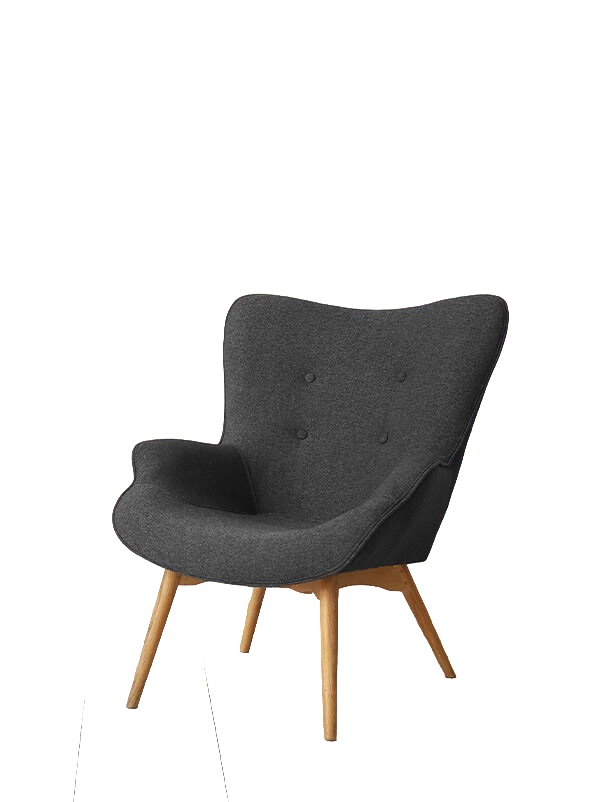
What BG-REMOVE provides:
- A single REST endpoint that works with backend services, mobile applications, automation workers, and serverless jobs. No SDK is required.
- Automatic foreground detection without a client-generated segmentation mask.
- Transparent PNG output with an alpha channel for compositing or reuse on a new background.
- Input through a public image URL or direct file upload, with output as Base64 JSON data, raw image bytes, or a file in your connected AWS S3 bucket.
- Access through the same monthly PixLab plan used for other media-processing endpoints.
High-volume and bulk background removal
BG-REMOVE processes one image per request. For bulk background removal, applications can distribute requests across queues, workers, serverless functions, or scheduled jobs within their account limits. This approach supports catalog imports, marketplace feeds, campaign updates, and recurring image-processing pipelines. The same engine powers the PixLab Bulk Background Remover ↗, a
browser interface for batch uploads and output review.
Common integration workflows
- Ecommerce and product catalogs: create consistent product cutouts for storefronts, marketplace listings, and catalog feeds.
- Marketing and advertising: prepare campaign assets for new layouts, formats, and background designs.
- SaaS and creative tools: add automatic background removal to image editors, content platforms, and asset-management workflows.
- Portraits and profile images: isolate people for profile-photo services, account onboarding, and branded templates.
Output quality depends on the source image. Low contrast, motion blur, heavy compression, occlusion, and similar foreground and background colors can make subject separation more difficult. Production workflows should review important assets and images with complex edges before publishing the result.
Private processing by default: PixLab processes submitted API images in volatile memory and purges them automatically when processing finishes. PixLab does not persist the payload unless you explicitly enable storage or export. With a connected AWS S3 bucket, output can be written directly to your own bucket. See the PixLab Privacy Policy for processing and retention details.
To get started, create an API key in the PixLab Console ↗, submit a public image URL or upload a file, and consume the returned image data. See the Python, JavaScript, PHP, and Ruby samples below ↓.
To remove visible text or watermarks instead of the complete background, use the TXT-REMOVE API. To detect and translate text inside an image, see the Image Text Translation API.
High-Volume Background Removal API Pricing
PixLab offers monthly API plans for developers and businesses processing images at high volume. The included media-processing calls can be used with BG-REMOVE and other PixLab endpoints, so one subscription can support several image workflows.
- Starter: $20 per month with 350,000 media-processing API calls, which can be used for up to 350,000 BG-REMOVE requests when the quota is dedicated to this endpoint.
- Pro: $39 per month with 900,000 media-processing API calls, which can be used for up to 900,000 BG-REMOVE requests when the quota is dedicated to this endpoint.
- Business and Enterprise: Unlimited API calls, Higher monthly quotas, storage, support, and options for large production workloads.
Low cost per image: with one image per request and the full monthly allowance dedicated to BG-REMOVE, Starter works out to approximately $0.00006 per included image, while Pro is approximately $0.00004 per included image. Your actual unit cost depends on plan usage.
Automated cutouts can also reduce manual edge cleanup across large product catalogs and recurring content pipelines. Review the current PixLab monthly API plans → or start a 7-day trial ↗.
HTTP Methods
GET, POST
Use GET with a public image URL or POST to upload a local file. Each request processes one source image.
HTTP Parameters
Required
| Fields | Type | Description |
|---|---|---|
img |
URL | Public URL of the image whose background should be removed. To upload a local image directly from your application, send a multipart/form-data POST request instead. See POST Request Body. |
key |
String | Your PixLab API key ↗. You may send the key in the WWW-Authenticate HTTP header instead of this parameter. |
Optional
| Fields | Type | Description |
|---|---|---|
compress |
Boolean | JPEG outputs are compressed by default to reduce transfer size; PNG outputs remain lossless. Set this field to false to disable JPEG compression. |
blob |
Boolean |
By default, BG-REMOVE returns a JSON object containing the Base64-encoded output image or a link to the result in your connected AWS S3 bucket. Set this parameter to true to return the raw image bytes instead. See HTTP Response ↓ and the code samples for details.
|
POST Request Body
Use POST when uploading a local image or sending request data as JSON. Foreground detection is automatic, so no segmentation mask is required.
Supported content types:
multipart/form-dataapplication/json
Use multipart/form-data to upload an image directly from your application; see the PixLab GitHub repository ↗ for a working example. For application/json, the image must already be available by URL. You can call the STORE endpoint first when temporary upload storage is needed.
HTTP Response
application/json
By default, BG-REMOVE returns a JSON object containing the Base64-encoded output image. If your AWS S3 bucket is connected through the PixLab Console ↗, the response can provide a direct link to the result in your bucket instead. When the blob parameter is set to
true, the endpoint returns the raw image bytes rather than JSON.
| Fields | Type | Description |
|---|---|---|
status |
Integer | HTTP 200 indicates success. Any other code indicates failure. |
imgData |
Base64 Data | Base64 encoded string of the output image data. |
mimeType |
String | MIME type of the output image, such as image/png. |
extension |
String | File extension of the output image, such as png or jpeg. |
link |
URL | Direct link to the output image in your own AWS S3 bucket, when S3 storage is connected through the PixLab Console ↗. This field is returned instead of imgData. |
error |
String |
Error description when status != 200.
|
blob |
BLOB | Raw image data returned instead of a JSON object when the blob parameter is set to true. |
Code Samples
import requests
import json
import base64
import os

# Programmatically remove backgrounds from input images using the PixLab BG-REMOVE API endpoint.
#
# Refer to the official documentation at: https://pixlab.io/endpoints/background-remove-api for the API reference
# guide and more code samples.

# Use POST to upload the image directly from your local folder. If your image is publicly available
# then make a simple GET request with a link to your image.
req = requests.post(
    'https://api.pixlab.io/bgremove',
    files={
        'file': open('./local_image.png', 'rb')  # The local image we are going to remove background from
    },
    data={
        'key': 'PIXLAB_API_KEY'  # PixLab API Key - Get yours from https://console.pixlab.io/
    }
)
reply = req.json()
if reply['status'] != 200:
    print(reply['error'])
else:
    imgData = reply['imgData']  # Base64 encoding of the output image
    mimetype = reply['mimeType']  # MIME type (i.e image/jpeg, etc.) of the output image
    extension = reply['extension']  # File extension (e.g., 'png', 'jpeg')

    # Decode base64 and save to disk
    try:
        img_bytes = base64.b64decode(imgData)
        output_filename = f"output_image.{extension}"
        with open(output_filename, "wb") as f:
            f.write(img_bytes)
        print(f"Background Removed Image saved to: {output_filename}")
    except Exception as e:
        print(f"Error saving output image: {e}")
// Programmatically remove backgrounds from input images using the PixLab BG-REMOVE API endpoint.
//
// Refer to the official documentation at: https://pixlab.io/endpoints/background-remove-api for the API reference
// guide and more code samples.

// Use POST to upload the image directly from your local folder. If your image is publicly available
// then make a simple GET request with a link to your image.

const apiKey = 'PIXLAB_API_KEY'; // PixLab API Key - Get yours from https://console.pixlab.io/
const apiUrl = 'https://api.pixlab.io/bgremove';
const imageFile = document.querySelector('input[type="file"]'); // Assuming you have an input file element

async function removeBackground() {
    if (!imageFile || !imageFile.files || !imageFile.files[0]) {
        console.error('Please select an image file.');
        return;
    }

    const file = imageFile.files[0];
    const formData = new FormData();
    formData.append('file', file);
    formData.append('key', apiKey);

    try {
        const response = await fetch(apiUrl, {
            method: 'POST',
            body: formData,
        });

        const reply = await response.json();

        if (reply.status !== 200) {
            console.error(reply.error);
        } else {
            const imgData = reply.imgData; // Base64 encoding of the output image
            const mimetype = reply.mimeType; // MIME type (i.e image/jpeg, etc.) of the output image
            const extension = reply.extension; // File extension (e.g., 'png', 'jpeg')

            // Decode base64 and save to disk
            try {
                const img_bytes = atob(imgData); // Decode base64
                const output_filename = `output_image.${extension}`;

                // Create a Blob from the base64 string
                const byteCharacters = atob(imgData);
                const byteArrays = [];

                for (let offset = 0; offset < byteCharacters.length; offset += 512) {
                    const slice = byteCharacters.slice(offset, offset + 512);
                    const byteNumbers = new Array(slice.length);
                    for (let i = 0; i < slice.length; i++) {
                        byteNumbers[i] = slice.charCodeAt(i);
                    }
                    const byteArray = new Uint8Array(byteNumbers);
                    byteArrays.push(byteArray);
                }

                const blob = new Blob(byteArrays, {type: mimetype});


                // Create a download link
                const url = URL.createObjectURL(blob);
                const a = document.createElement('a');
                a.href = url;
                a.download = output_filename;
                document.body.appendChild(a);
                a.click();
                document.body.removeChild(a);
                URL.revokeObjectURL(url); // Clean up

                console.log(`Background Removed Image saved to: ${output_filename}`);
            } catch (e) {
                console.error(`Error saving output image: ${e}`);
            }
        }
    } catch (error) {
        console.error('Error:', error);
    }
}

// Example: Attach to a button click
const button = document.querySelector('#removeBackgroundButton'); // Assuming you have a button with this ID
if (button) {
    button.addEventListener('click', removeBackground);
}
<?php
# Programmatically remove backgrounds from input images using the PixLab BG-REMOVE API endpoint.
#
# Refer to the official documentation at: https://pixlab.io/endpoints/background-remove-api for the API reference
# guide and more code samples.

# Use POST to upload the image directly from your local folder. If your image is publicly available
# then make a simple GET request with a link to your image.

$url = 'https://api.pixlab.io/bgremove';
$apiKey = 'PIXLAB_API_KEY'; // PixLab API Key - Get yours from https://console.pixlab.io/
$imagePath = './local_image.png'; // The local image we are going to remove background from
$outputFilename = 'output_image';

$ch = curl_init();

$postData = [
    'key' => $apiKey,
    'file' => new CURLFile(realpath($imagePath))
];

curl_setopt($ch, CURLOPT_URL, $url);
curl_setopt($ch, CURLOPT_POST, 1);
curl_setopt($ch, CURLOPT_POSTFIELDS, $postData);
curl_setopt($ch, CURLOPT_RETURNTRANSFER, true);

$response = curl_exec($ch);
curl_close($ch);

$reply = json_decode($response, true);

if ($reply['status'] != 200) {
    echo $reply['error'] . PHP_EOL;
} else {
    $imgData = $reply['imgData'];  // Base64 encoding of the output image
    $mimeType = $reply['mimeType'];  // MIME type (i.e image/jpeg, etc.) of the output image
    $extension = $reply['extension'];  // File extension (e.g., 'png', 'jpeg')

    // Decode base64 and save to disk
    try {
        $imgBytes = base64_decode($imgData);
        $outputFilename = $outputFilename . "." . $extension;
        file_put_contents($outputFilename, $imgBytes);
        echo "Background Removed Image saved to: " . $outputFilename . PHP_EOL;
    } catch (Exception $e) {
        echo "Error saving output image: " . $e->getMessage() . PHP_EOL;
    }
}
require 'net/http'
require 'json'
require 'base64'
require 'uri'

# Programmatically remove backgrounds from input images using the PixLab BG-REMOVE API endpoint.
#
# Refer to the official documentation at: https://pixlab.io/endpoints/background-remove-api for the API reference
# guide and more code samples.

# Use POST to upload the image directly from your local folder. If your image is publicly available
# then make a simple GET request with a link to your image.

uri = URI('https://api.pixlab.io/bgremove')
http = Net::HTTP.new(uri.host, uri.port)
http.use_ssl = true

request = Net::HTTP::Post.new(uri.path)
form_data = {
  'key' => 'PIXLAB_API_KEY', # PixLab API Key - Get yours from https://console.pixlab.io/
  'file' => File.open('./local_image.png')
}

request.set_form(form_data, 'multipart/form-data')

response = http.request(request)
reply = JSON.parse(response.body)

if reply['status'] != 200
  puts reply['error']
else
  img_data = reply['imgData']  # Base64 encoding of the output image
  mimetype = reply['mimeType']  # MIME type (i.e image/jpeg, etc.) of the output image
  extension = reply['extension']  # File extension (e.g., 'png', 'jpeg')

  # Decode base64 and save to disk
  begin
    img_bytes = Base64.decode64(img_data)
    output_filename = "output_image.#{extension}"
    File.open(output_filename, "wb") do |f|
      f.write(img_bytes)
    end
    puts "Background Removed Image saved to: #{output_filename}"
  rescue => e
    puts "Error saving output image: #{e}"
  end
end
Frequently Asked Questions
Can the PixLab Background Removal API process images in bulk?
Yes. BG-REMOVE is built for high-volume image processing and bulk background-removal workflows. Send one image per request and distribute jobs across queues, workers, serverless functions, or scheduled pipelines, subject to account limits. The PixLab Bulk Background Remover ↗ provides a browser interface powered by the same engine.
How much does the Background Removal API cost per image?
Monthly paid plans start at $20 for 350,000 included media-processing API calls. When the quota is used only for BG-REMOVE, with one image per request and full monthly usage, that is approximately $0.00006 per image. The $39 Pro plan includes 900,000 media-processing calls, or approximately $0.00004 per image under the same assumptions. See current PixLab API pricing →.
How does PixLab handle hair, glass, and detailed product edges?
PixLab uses high-accuracy subject segmentation designed to preserve difficult boundaries such as hair, fur, glass, product contours, and semi-transparent details. This reduces mask cleanup and helps produce consistent cutouts across mixed image batches.
How does PixLab handle images uploaded to BG-REMOVE?
By default, submitted API images are processed in volatile memory, automatically purged after processing, and not persisted by PixLab. If storage or export is explicitly enabled, output can be written to the configured destination, including your connected AWS S3 bucket. Review the Privacy Policy for details.
How can the API return the processed image?
The endpoint can return Base64-encoded image data in JSON, raw image bytes when blob=true, or a direct link to output stored in your connected AWS S3 bucket.
Similar API Endpoints
tagimg, nsfw, describe, docscan, llm-parse, text-watermark-remove, image-text-translate, facelookup ↗, faceverify ↗, img-embed, query